这是什么

Claude Code 终端底部有一行 status line,默认信息比较少。它支持自定义:你给它一个命令,Claude Code 每次刷新时把一段 JSON 从 stdin 喂给这个命令,命令打印什么,状态栏就显示什么。

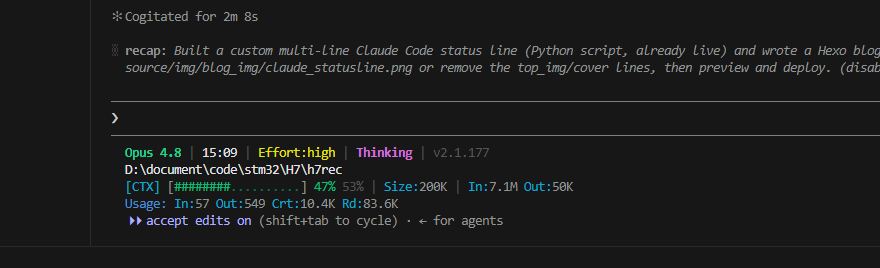
我把它做成了下面这样的四行状态栏(实时刷新):
claudecodeStatusline

1
2
3
4
GLM-5.1 | 15:04 | Effort:high | Thinking | v2.1.126
C:\Users\Alan
[CTX] [#######...........] 38% 62% | Size:200K | In:6.3M Out:41K
Usage: In:376 Out:211 Crt:1.4K Rd:74.6K

逐行说明:

  1. 模型名 · 时间 · Effort 等级 · Thinking 开关 · 版本号
  2. 当前工作目录(完整路径)
  3. 上下文进度条:已用百分比 / 剩余百分比 | 上下文窗口大小 | 整个会话累计的输入/输出 token
  4. Usage:最近一次回复的 token 明细(输入 / 输出 / 缓存写入 / 缓存读取)

进度条颜色随使用率变化:绿(<50%)→ 黄(50–79%)→ 红(≥80%)。

数据从哪来

这是整件事最关键的部分,因为不同字段来源不一样。

1. stdin 的 JSON(Claude Code 每次刷新都给)

状态栏脚本启动时,Claude Code 会从标准输入塞一段 JSON 进来,常用字段:

字段 含义
.model.display_name 模型显示名
.version Claude Code 版本号
.workspace.current_dir 当前目录
.cwd 当前目录(备用)
.transcript_path 当前会话的对话记录文件路径(JSONL)

模型名、版本、目录直接从这里取就行。

2. transcript JSONL(token 数据的真正来源)

token 用量不在 stdin 的 JSON 里。但 .transcript_path 指向的那个 .jsonl 文件,每一行是一条消息,助手消息里带一个 usage 块:

1
2
3
4
5
6
{
"input_tokens": 240,
"cache_creation_input_tokens": 5774,
"cache_read_input_tokens": 55205,
"output_tokens": 293
}

于是脚本逐行读这个文件:

  • 上下文已用 = 最后一条消息的 input_tokens + cache_creation + cache_read,再除以上下文窗口得到百分比;
  • 累计 In/Out = 把每条消息的 usage 全部累加。

3. Effort 等级(实时读 settings.json)

这是个坑。/effort 命令切换的等级,Claude Code 并没有通过 stdin 传给状态栏。一开始我用一个静态文件存它,结果发现切换 effort 后状态栏不跟着变。

后来定位到:/effort 实际把等级写进了 ~/.claude/settings.jsoneffortLevel 字段。所以脚本每次刷新直接读这个文件,就能做到真·实时——/effort 一切换,状态栏立刻更新。

4. Thinking 开关

这个 Claude Code 没有持久化到任何可读的地方,所以脚本用一个可选文件 ~/.claude/statusline-thinking 来控制显示(内容写 off 就隐藏),默认显示。

为什么用 Python 而不是 bash

状态栏的常规做法是 bash + jq 解析 JSON。但我这台机器没装 jq,而要解析 transcript 的嵌套 JSON、逐行累加 token,纯 sed/grep 很容易出错(我第一版就踩了,两个进度条会取到同一个值)。系统里有 Python 3.12,直接用 Python 解析 JSON 又稳又好维护,所以换成了 Python。

完整脚本

保存为 ~/.claude/statusline-command.py

1
2
3
4
5
6
7
8
9
10
11
12
13
14
15
16
17
18
19
20
21
22
23
24
25
26
27
28
29
30
31
32
33
34
35
36
37
38
39
40
41
42
43
44
45
46
47
48
49
50
51
52
53
54
55
56
57
58
59
60
61
62
63
64
65
66
67
68
69
70
71
72
73
74
75
76
77
78
79
80
81
82
83
84
85
86
87
88
89
90
91
92
93
94
95
96
97
98
99
100
101
102
103
104
105
106
107
108
109
110
111
112
113
114
115
116
117
118
119
120
121
122
123
124
125
126
127
128
129
130
131
132
133
134
135
136
137
138
139
140
141
142
143
144
145
146
147
148
149
150
151
152
#!/usr/bin/env python3
# -*- coding: utf-8 -*-
"""
Claude Code status line (multi-line).

Layout (4 lines):
1) MODEL | HH:MM | Effort:<lvl> | Thinking | vX.Y.Z
2) <current working directory, full path>
3) [CTX] [#####.........] <used>% <free>% | Size:<window> | In:<cum> Out:<cum>
4) Usage: In:<last_in> Out:<last_out> Crt:<last_cache_create> Rd:<last_cache_read>
"""

import sys, os, json, datetime

# ---------- ANSI ----------
R = "\033[0m"
DIM = "\033[2m"
B = "\033[1m"
def c(n): return f"\033[{n}m"
WHITE, GREY = c(97), c(90)
GREEN, YELLOW, RED, CYAN, MAG, BLUE = c(32), c(33), c(31), c(36), c(35), c(34)

CTX_WINDOW = int(os.environ.get("CC_CTX_WINDOW", "200000"))

def read_stdin_json():
try:
data = sys.stdin.read()
return json.loads(data) if data.strip() else {}
except Exception:
return {}

def human(n):
"""1234 -> 1.2K, 8_000_000 -> 8.0M (drops trailing .0)."""
try:
n = float(n)
except Exception:
return "0"
for unit, div in (("M", 1_000_000.0), ("K", 1000.0)):
if abs(n) >= div:
v = n / div
s = f"{v:.1f}".rstrip("0").rstrip(".")
return f"{s}{unit}"
return str(int(n))

def color_for_pct(p):
return GREEN if p < 50 else (YELLOW if p < 80 else RED)

def bar(pct, slots=18):
pct = max(0, min(100, pct))
filled = (pct * slots + 50) // 100
clr = color_for_pct(pct)
return f"[{clr}{'#' * filled}{DIM}{'.' * (slots - filled)}{R}]"

def override(name, default=""):
p = os.path.expanduser(f"~/.claude/{name}")
try:
with open(p, encoding="utf-8") as f:
return f.read().strip()
except Exception:
return default

def read_effort(default="medium"):
"""Live-read the effort level from settings.json, where /effort writes it."""
p = os.path.expanduser("~/.claude/settings.json")
try:
with open(p, encoding="utf-8") as f:
return (json.load(f).get("effortLevel") or default)
except Exception:
return default

def parse_transcript(path):
"""Return (last_usage_dict, cum_in, cum_out)."""
last = None
cum_in = cum_out = 0
if not path or not os.path.isfile(path):
return None, 0, 0
try:
with open(path, encoding="utf-8") as f:
for line in f:
line = line.strip()
if not line:
continue
try:
o = json.loads(line)
except Exception:
continue
u = (o.get("message") or {}).get("usage")
if not u:
continue
last = u
cum_in += (u.get("input_tokens", 0)
+ u.get("cache_creation_input_tokens", 0)
+ u.get("cache_read_input_tokens", 0))
cum_out += u.get("output_tokens", 0)
except Exception:
pass
return last, cum_in, cum_out

def main():
j = read_stdin_json()

model = (j.get("model") or {}).get("display_name") or "Claude"
version = j.get("version") or ""
cwd = (j.get("workspace") or {}).get("current_dir") or j.get("cwd") or os.getcwd()
transcript = j.get("transcript_path") or ""

now = datetime.datetime.now().strftime("%H:%M")
effort = read_effort("medium")
thinking_raw = override("statusline-thinking", "on").lower()
thinking_on = thinking_raw not in ("", "off", "0", "false", "no")

last, cum_in, cum_out = parse_transcript(transcript)
ctx_used = 0
if last:
ctx_used = (last.get("input_tokens", 0)
+ last.get("cache_creation_input_tokens", 0)
+ last.get("cache_read_input_tokens", 0))
used_pct = int(round(100.0 * ctx_used / CTX_WINDOW)) if CTX_WINDOW else 0
used_pct = max(0, min(100, used_pct))
free_pct = 100 - used_pct

li = last.get("input_tokens", 0) if last else 0
lo = last.get("output_tokens", 0) if last else 0
lc = last.get("cache_creation_input_tokens", 0) if last else 0
lr = last.get("cache_read_input_tokens", 0) if last else 0

# ---- line 1 ----
seg = [f"{B}{GREEN}{model}{R}", f"{WHITE}{now}{R}",
f"{YELLOW}Effort:{effort}{R}"]
if thinking_on:
seg.append(f"{MAG}{B}Thinking{R}")
if version:
seg.append(f"{DIM}v{version}{R}")
line1 = f" {DIM}|{R} ".join(seg)

# ---- line 2 ----
line2 = f"{WHITE}{cwd}{R}"

# ---- line 3 ----
line3 = (f"{CYAN}[CTX]{R} {bar(used_pct)} "
f"{color_for_pct(used_pct)}{used_pct}%{R} {DIM}{free_pct}%{R} "
f"{DIM}|{R} {CYAN}Size:{R}{human(CTX_WINDOW)} "
f"{DIM}|{R} {CYAN}In:{R}{human(cum_in)} {CYAN}Out:{R}{human(cum_out)}")

# ---- line 4 ----
line4 = (f"{BLUE}Usage:{R} {CYAN}In:{R}{human(li)} {CYAN}Out:{R}{human(lo)} "
f"{CYAN}Crt:{R}{human(lc)} {CYAN}Rd:{R}{human(lr)}")

sys.stdout.write("\n".join([line1, line2, line3, line4]))

if __name__ == "__main__":
main()

怎么设置

第一步:放脚本

把上面的脚本保存为:

1
~/.claude/statusline-command.py

Windows 上 ~ 就是 C:\Users\你的用户名,所以完整路径是
C:\Users\你的用户名\.claude\statusline-command.py

第二步:在 settings.json 里启用

编辑 ~/.claude/settings.json,加上 statusLine 字段:

1
2
3
4
5
6
{
"statusLine": {
"type": "command",
"command": "python ~/.claude/statusline-command.py"
}
}

如果 python 命令不在 PATH 里,就换成 Python 的完整路径,比如
"command": "C:/Users/你的用户名/AppData/Local/Programs/Python/Python312/python.exe ~/.claude/statusline-command.py"

保存后状态栏会在下一次交互时自动变成新样式,无需重启。

第三步(可选):调整

  • 上下文窗口大小:默认按 200K 算。如果你的模型窗口不是 200K,设个环境变量 CC_CTX_WINDOW,比如 CC_CTX_WINDOW=1000000
  • 隐藏 Thinking:新建文件 ~/.claude/statusline-thinking,内容写 off
  • 进度条样式:改 bar() 函数里的 '#''.',或者 slots(格子数)。

自己测试一下

写完脚本想确认它能跑,不用真的进 Claude Code,直接喂一段 JSON 给它(注意要带上真实的 transcript 路径才会有 token 数据):

1
echo '{"model":{"display_name":"GLM-5.1"},"version":"2.1.126","workspace":{"current_dir":"C:/Users/Alan"},"transcript_path":"你的某个会话.jsonl的路径"}' | python ~/.claude/statusline-command.py

能打印出四行带颜色的文字就说明成功了。

踩过的坑

  1. 没有 jq 不要硬上 sed。纯文本解析嵌套 JSON 很脆,两个进度条取到同一个值是我第一版的真实 bug。有 Python 就用 Python。
  2. effort 不在 stdin 里。别从 stdin 找它,去读 settings.jsoneffortLevel,这样才实时。
  3. Windows 路径转义。脚本里读文件用 os.path.expanduser("~/..."),跨平台都能用;测试时拼 JSON 字符串注意反斜杠转义。
  4. 状态栏脚本要快、要静默。它会被频繁调用,任何异常都要吞掉(脚本里全程 try/except 兜底),否则状态栏会闪报错。

小结

Claude Code 的 statusLine 本质就是「给它一个命令,它喂 JSON,你打印字符串」。把 stdin JSON、transcript JSONL、settings.json 三个数据源拼起来,就能做出一个信息密度高、还实时刷新的状态栏。核心就一个脚本 + settings.json 里三行配置。